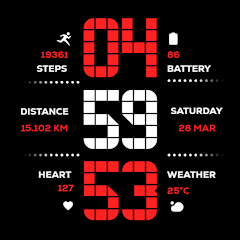
Matrix Digital WatchFace

সকলো
info
১০০+
ডাউনল’ড


এই এপ্টোৰ বিষয়ে
Elevate your Wear OS experience with the perfect fusion of retro-digital aesthetics and high-performance functionality. Designed specifically for the modern user, this watch face brings a classic tech vibe to your wrist.
Timekeeping: Precise Digital clock with full support for both 12H and 24H formats.
Health & Fitness: * Detailed Step Counter for daily activity tracking.
Real-time Heart Rate monitoring to stay on top of your vitals.
Dedicated Distance Tracking displayed in Kilometers (KM).
Smart Info: Integrated Weather updates and Date display at a glance.
Battery Optimization: Features an Advanced Always-On Display (AOD) designed to maximize battery life without sacrificing style.
🎨 Customization Options
13 Vibrant Color Schemes: Match your watch face to your outfit or mood with a wide variety of colors.
Device Optimization: Specifically tuned for seamless performance on Samsung Galaxy Watch and Google Pixel Watch.
📥 Step-by-Step Installation Guide
Open Play Store: On your Wear OS smartwatch, navigate to the Google Play Store.
Search: Use the search icon and type "Matrix Digital WatchFace".
Install: Tap the Install button to download it directly to your device.
Set as Default: * Long-press your current watch face.
Swipe right to "Add Watch Face" or click the "+" icon.
Select Matrix Digital from the list to apply.
Personalize: Long-press the watch face again and tap "Customize" to choose from the 13 available color themes.
Timekeeping: Precise Digital clock with full support for both 12H and 24H formats.
Health & Fitness: * Detailed Step Counter for daily activity tracking.
Real-time Heart Rate monitoring to stay on top of your vitals.
Dedicated Distance Tracking displayed in Kilometers (KM).
Smart Info: Integrated Weather updates and Date display at a glance.
Battery Optimization: Features an Advanced Always-On Display (AOD) designed to maximize battery life without sacrificing style.
🎨 Customization Options
13 Vibrant Color Schemes: Match your watch face to your outfit or mood with a wide variety of colors.
Device Optimization: Specifically tuned for seamless performance on Samsung Galaxy Watch and Google Pixel Watch.
📥 Step-by-Step Installation Guide
Open Play Store: On your Wear OS smartwatch, navigate to the Google Play Store.
Search: Use the search icon and type "Matrix Digital WatchFace".
Install: Tap the Install button to download it directly to your device.
Set as Default: * Long-press your current watch face.
Swipe right to "Add Watch Face" or click the "+" icon.
Select Matrix Digital from the list to apply.
Personalize: Long-press the watch face again and tap "Customize" to choose from the 13 available color themes.
Modern Matrix-style digital watch face with 13 colors and health data.
আপডে’ট কৰা তাৰিখ
বিকাশকৰ্তাসকলে আপোনাৰ ডেটা কেনেকৈ সংগ্ৰহ আৰু শ্বেয়াৰ কৰে সেয়া বুজি পোৱাৰ জৰিয়তে সুৰক্ষা আৰম্ভ হয়। ডেটাৰ গোপনীয়তা আৰু সুৰক্ষা প্ৰণালী আপোনাৰ ব্যৱহাৰ, অঞ্চল আৰু বয়সৰ ওপৰত ভিত্তি কৰি ভিন্ন হ’ব পাৰে। বিকাশকৰ্তাগৰাকীয়ে এই তথ্যখিনি প্ৰদান কৰিছে আৰু সময়ৰ লগে লগে এয়া আপডে’ট কৰিব পাৰে।


নতুন কি আছে
1.0
• Initial Release.
• Initial Release.
এপৰ সমৰ্থন
বিকাশকৰ্তাৰ বিষয়ে
ABUBKAR ISMAIL MANASIYA
justwatchface@gmail.com
496, Rahmat masjid, rahmat nagar
bavalchudi, banaskantha, Gujarat
Chhapi, Gujarat 385210
India


