
Verrou – minimal watch face


Tout public
info
10+
Téléchargements

Tout public
En savoir plus


À propos de l'application
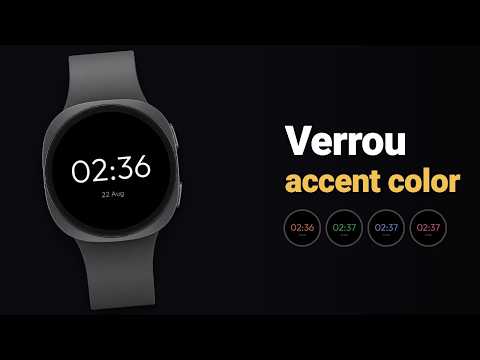
Verrou strips your watch back to the essential: a large, legible digital time, lockscreen-style, on deep AMOLED black. Nothing superfluous, nothing to distract — just the time, set in space.
WHY VERROU
• Legible at a glance: large digits, high contrast, zero clutter.
• Pure black (#000000): easy on the battery on AMOLED screens.
• Clean always-on (AOD): the time stays readable, never cluttered.
• 49 accent colors to choose from, right on the watch (long-press to Edit).
BUILT FOR WEAR OS
• Native Watch Face Format (WFF), ready for Wear OS 4 and beyond.
• Galaxy Watch, Pixel Watch and other recent Wear OS watches.
• Localized date, 12/24-hour time following your watch.
• Configured on the watch, no companion app required.
ELEGANCE BY SUBTRACTION
No busy dial, no needless widgets. Verrou embraces restraint: a single color accent, crisp type, generous negative space. The watch face you keep.
A question or an idea? Write to us: hugoferreirapro803@gmail.com
WHY VERROU
• Legible at a glance: large digits, high contrast, zero clutter.
• Pure black (#000000): easy on the battery on AMOLED screens.
• Clean always-on (AOD): the time stays readable, never cluttered.
• 49 accent colors to choose from, right on the watch (long-press to Edit).
BUILT FOR WEAR OS
• Native Watch Face Format (WFF), ready for Wear OS 4 and beyond.
• Galaxy Watch, Pixel Watch and other recent Wear OS watches.
• Localized date, 12/24-hour time following your watch.
• Configured on the watch, no companion app required.
ELEGANCE BY SUBTRACTION
No busy dial, no needless widgets. Verrou embraces restraint: a single color accent, crisp type, generous negative space. The watch face you keep.
A question or an idea? Write to us: hugoferreirapro803@gmail.com
Minimalist lockscreen-style watch face. Pure AMOLED black, clean always-on.
Date de mise à jour
La sécurité, c'est d'abord comprendre comment les développeurs collectent et partagent vos données. Les pratiques concernant leur confidentialité et leur protection peuvent varier selon votre utilisation, votre région et votre âge. Le développeur a fourni ces informations et peut les modifier ultérieurement.
- Aucune donnée partagée avec des tiersEn savoir plus sur la manière dont les développeurs déclarent le partage
- Aucune donnée collectéeEn savoir plus sur la manière dont les développeurs déclarent la collecte


Nouveautés
49 accent colors to choose from right on the watch (long-press to Edit), and the date can now be edited with a tap on the watch face.
Tout public
En savoir plusAssistance de l'appli
À propos du développeur
HUGO FERREIRA CONSULTING
developer@pixelmore.app
60 RUE FRANCOIS IER
75008 PARIS
France
+33 6 16 55 79 31


