
AWD Cloud Candy watchface

Tout public
info
100+
Téléchargements

Tout public
En savoir plus




À propos de l'application
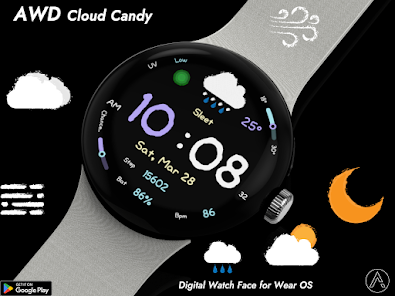
Readability: Large digital clock with a unique, friendly font.
Weather at a glance: Easy-to-understand icons for current conditions.
Daily Stats: Tracks your steps, heart rate, and battery level.
Simplicity: A minimalist layout that focuses on essential information.
Features
• Weather condition icon
• Temp , Low & High temperature progress bar
• UV indicator
• Step count
• Battery %
• Heart rate
• 12/24H
• Change of precipitation progress bar
• Day / Date
Customizing
Customization
• 16 Color style change
• Blingking ON/OFF
• 3 App shortcut
- Support wear OS
- Square screen watch mode is not supported.
***Installation Guide***
The mobile app guides you through the watch face installation process.
You can delete the mobile app once the watch face installation is complete.
1. Your watch and phone must be connected via Bluetooth.
2. Tap the "Install" button in the mobile guide app.
3. Follow the instructions to install the watch face. It will take only a few minutes.
You can also search for and install watch faces directly from the Google app on your watch.
You can also search for and install watch faces from a mobile web browser.
Send feedback : aiwatchdesign@gmail.com
Weather at a glance: Easy-to-understand icons for current conditions.
Daily Stats: Tracks your steps, heart rate, and battery level.
Simplicity: A minimalist layout that focuses on essential information.
Features
• Weather condition icon
• Temp , Low & High temperature progress bar
• UV indicator
• Step count
• Battery %
• Heart rate
• 12/24H
• Change of precipitation progress bar
• Day / Date
Customizing
Customization
• 16 Color style change
• Blingking ON/OFF
• 3 App shortcut
- Support wear OS
- Square screen watch mode is not supported.
***Installation Guide***
The mobile app guides you through the watch face installation process.
You can delete the mobile app once the watch face installation is complete.
1. Your watch and phone must be connected via Bluetooth.
2. Tap the "Install" button in the mobile guide app.
3. Follow the instructions to install the watch face. It will take only a few minutes.
You can also search for and install watch faces directly from the Google app on your watch.
You can also search for and install watch faces from a mobile web browser.
Send feedback : aiwatchdesign@gmail.com
Clear digital watch face with intuitive weather icons.
Date de mise à jour
La sécurité, c'est d'abord comprendre comment les développeurs collectent et partagent vos données. Les pratiques concernant leur confidentialité et leur protection peuvent varier selon votre utilisation, votre région et votre âge. Le développeur a fourni ces informations et peut les modifier ultérieurement.
- Aucune donnée partagée avec des tiersEn savoir plus sur la manière dont les développeurs déclarent le partage
- Aucune donnée collectéeEn savoir plus sur la manière dont les développeurs déclarent la collecte


Tout public
En savoir plusAssistance de l'appli
phone
Numéro de téléphone
+821042465646
À propos du développeur
왕우진
aiwatchdesign@gmail.com
완정로65번안길 17 (마전동, 금호어울림아파트)
101동204호
검단구, 인천광역시 23469
South Korea


