
Paddle Tracker: Kayak & SUP


Everyone
info
0+
Downloads

Everyone
Learn more


About this app
Paddle Tracker records your paddling in a kayak, a canoe, on a SUP or in a dragon boat: stroke rate and strokes from your wrist, speed and distance from GPS, and how far each stroke takes you. Paddle freely, to a time or distance goal, or in intervals.
Use this tracker to track your paddling with stroke rate, speed, distance and intervals. Want it customized? Feel free to contact us.
Features:
- Four boats: kayak, canoe, SUP and dragon boat; the app remembers your last choice
- Stroke rate and stroke count from the wrist, no extra sensor needed; in a kayak the strokes on both sides count
- Speed and distance from the watch's GPS
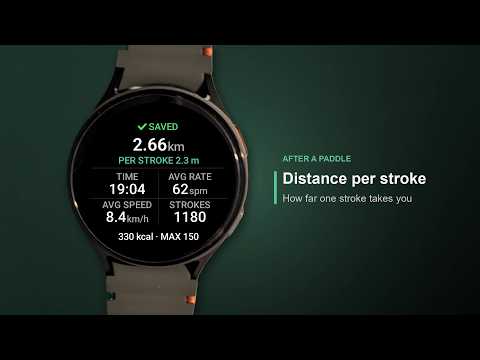
- Distance per stroke: how far one stroke takes you
- Programmes: free paddle, time goal (5 to 600 minutes), distance goal (in km, mi or nautical miles), intervals
- Interval presets (6x1:00/1:00, 5x2:00/1:00, 10x0:30/0:30, 4x4:00/2:00, 5x5:00/1:00) or your own work, rest and rounds
- Vibration at the phase change, a countdown in the last three seconds; the back button skips to the next phase
- Goals: an arc along the edge fills up, the watch vibrates when you reach it
- Canoe and SUP: a vibration every 10 to 100 strokes reminds you to switch sides (switched on in the settings)
- Two pages: stroke rate, speed, distance and heart rate; average rate, average speed, distance per stroke and calories
- Speed in km/h, mph or knots
- Summary after saving: distance, distance per stroke, time, average rate, average speed, strokes, calories and highest heart rate
- The phone app can share the GPS track of a session as a GPX file with an app you choose
- No tap ever starts or stops a recording: press the side button or hold the screen for a second, so water on the display does not end it by accident
- History on the watch with your newest 100 sessions
- Average and maximum heart rate in the history
- Available in 28 languages
Settings on the watch: count strokes, side switch reminder (canoe, SUP), speed unit (knots, km/h or mph), countdown vibration, vibration at the goal, stop after the last round, and your max heart rate for the zone colors.
How to use:
1. Choose the boat: a tap selects, the green arrow button goes on
2. Choose the programme and, for a goal or intervals, its values; the green arrow button (or the side button) goes on
3. Wait until the screen shows that GPS is ready, then press the side button or hold the screen for a second
4. Swipe up or down for the second page
5. In intervals, the back button skips to the next phase (without a back button: hold the lower half of the screen)
6. Stop the same way you started; choose Continue, Save or Discard
Settings and History: the "⋯" at the bottom of the first screen.
Works on the watch alone: your sessions stay on this watch. A small companion app for the phone comes with it. It writes each saved session to Health Connect on your phone and does nothing else. There every session appears as paddling, named after the boat, with its distance and calories. It is optional: the watch app works on its own, and neither app uses an internet connection. Your heart rate curve goes to Health Connect too. No ads, no subscription, no account.
Questions or problems? Please write to us via the contact form.
Requires Wear OS 3 or newer.
Use this tracker to track your paddling with stroke rate, speed, distance and intervals. Want it customized? Feel free to contact us.
Features:
- Four boats: kayak, canoe, SUP and dragon boat; the app remembers your last choice
- Stroke rate and stroke count from the wrist, no extra sensor needed; in a kayak the strokes on both sides count
- Speed and distance from the watch's GPS
- Distance per stroke: how far one stroke takes you
- Programmes: free paddle, time goal (5 to 600 minutes), distance goal (in km, mi or nautical miles), intervals
- Interval presets (6x1:00/1:00, 5x2:00/1:00, 10x0:30/0:30, 4x4:00/2:00, 5x5:00/1:00) or your own work, rest and rounds
- Vibration at the phase change, a countdown in the last three seconds; the back button skips to the next phase
- Goals: an arc along the edge fills up, the watch vibrates when you reach it
- Canoe and SUP: a vibration every 10 to 100 strokes reminds you to switch sides (switched on in the settings)
- Two pages: stroke rate, speed, distance and heart rate; average rate, average speed, distance per stroke and calories
- Speed in km/h, mph or knots
- Summary after saving: distance, distance per stroke, time, average rate, average speed, strokes, calories and highest heart rate
- The phone app can share the GPS track of a session as a GPX file with an app you choose
- No tap ever starts or stops a recording: press the side button or hold the screen for a second, so water on the display does not end it by accident
- History on the watch with your newest 100 sessions
- Average and maximum heart rate in the history
- Available in 28 languages
Settings on the watch: count strokes, side switch reminder (canoe, SUP), speed unit (knots, km/h or mph), countdown vibration, vibration at the goal, stop after the last round, and your max heart rate for the zone colors.
How to use:
1. Choose the boat: a tap selects, the green arrow button goes on
2. Choose the programme and, for a goal or intervals, its values; the green arrow button (or the side button) goes on
3. Wait until the screen shows that GPS is ready, then press the side button or hold the screen for a second
4. Swipe up or down for the second page
5. In intervals, the back button skips to the next phase (without a back button: hold the lower half of the screen)
6. Stop the same way you started; choose Continue, Save or Discard
Settings and History: the "⋯" at the bottom of the first screen.
Works on the watch alone: your sessions stay on this watch. A small companion app for the phone comes with it. It writes each saved session to Health Connect on your phone and does nothing else. There every session appears as paddling, named after the boat, with its distance and calories. It is optional: the watch app works on its own, and neither app uses an internet connection. Your heart rate curve goes to Health Connect too. No ads, no subscription, no account.
Questions or problems? Please write to us via the contact form.
Requires Wear OS 3 or newer.
Kayak, canoe, SUP, dragon boat: stroke rate from the wrist, GPS speed, intervals
Updated on
Safety starts with understanding how developers collect and share your data. Data privacy and security practices may vary based on your use, region, and age. The developer provided this information and may update it over time.
- No data shared with third partiesLearn more about how developers declare sharing
- No data collectedLearn more about how developers declare collection


What’s new
2026-10-13 - 1.10
- First release
- First release
Everyone
Learn moreApp support
About the developer
Richard Junggebauer
support@iovion.com
Rendsburger Landstr. 148
24113 Kiel
Germany
+49 177 6456147


